
Download PTE AV Studio – Free Multimedia Tool for Mac Photographers
Overview
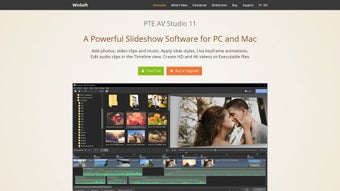
PTE AV Studio is a free multimedia application built exclusively for macOS, targeting photographers, videographers, and anyone who wants to turn static images into engaging audiovisual stories. Unlike generic video editors, PTE AV Studio focuses on the seamless integration of photos, short video clips, transitions, and background music to produce polished slideshows and mini‑movies without the steep learning curve of professional suites. The interface is clean, drag‑and‑drop‑friendly, and optimized for Retina displays, making it easy for beginners to start creating right after the first launch.
At the same time, power users will appreciate the fine‑grained control over timing, layering, and export settings, which are all accessible through intuitive menus and context‑sensitive panels. Because the software is free, it’s an attractive entry point for Mac users who need a reliable tool for client presentations, portfolio showcases, or personal photo‑album projects. PTE AV Studio also supports a wide array of image and video formats—including JPEG, PNG, HEIC, MOV, and MP4—ensuring that users can work with files straight from their cameras or smartphones without extra conversion steps.
Security is baked in; the app is notarized by Apple, runs sandboxed, and does not collect personal data, giving peace of mind to privacy‑conscious creators. Whether you’re preparing a wedding slideshow, a travel video, or a product demo, PTE AV Studio offers the essential toolkit to blend visuals and sound into a compelling narrative, all while remaining free, secure, and constantly updated for the latest macOS releases.
Key Features that Set PTE AV Studio Apart
- Drag‑and‑Drop Timeline: Arrange photos, video clips, and audio tracks on an intuitive timeline that automatically snaps to beats and transitions.
- Rich Transition Library: Choose from over 30 built‑in transitions—fade, slide, zoom, and cinematic wipes—to add professional polish without third‑party plugins.
- Music & Sound Integration: Import background music, adjust volume envelopes, and sync visual effects to audio peaks for a synchronized viewing experience.
- Multi‑Format Support: Native handling of JPEG, PNG, HEIC, TIFF, MOV, MP4, and GIF, eliminating the need for external conversion tools.
- Resolution & Aspect Ratio Flexibility: Export projects in 1080p, 4K, or custom dimensions, with automatic letterboxing for widescreen or square formats.
- Preset Themes & Templates: Start quickly with ready‑made themes that include pre‑designed title cards, lower thirds, and color grading presets.
- Export Options: Directly save to local disk, upload to YouTube, or share via AirDrop, all with one‑click export presets for optimal file size.
- Mac‑Optimized Performance: Leverages Apple’s Metal framework for smooth rendering on both Intel and Apple Silicon Macs.
- Secure, No‑Ads Experience: The free version remains ad‑free and respects user privacy, with regular updates signed by Apple.
- Community Resources: Access a growing library of tutorials, template packs, and user forums directly from the Help menu.
These features collectively make PTE AV Studio a versatile, cost‑effective solution for creators who need a reliable multimedia editor on macOS. The balance between simplicity and depth ensures that the software can grow with the user, from quick holiday slideshows to more sophisticated client presentations.
Installation & Usage Instructions
Getting started with PTE AV Studio is straightforward, even for users who are new to multimedia editing. Follow these step‑by‑step instructions to download, install, and begin creating your first project.
Step 1: Download the Installer
Visit the official PTE AV Studio website and click the “Download for macOS” button. The installer is a small .dmg file (approximately 80 MB), which downloads quickly on most broadband connections. Because the app is notarized by Apple, macOS will display a security prompt confirming that the software is from an identified developer.
Step 2: Install the Application
Open the downloaded .dmg, then drag the PTE AV Studio icon into the Applications folder. macOS may ask for your administrator password to complete the copy. Once the copy finishes, eject the installer by right‑clicking the mounted volume and selecting “Eject.”
Step 3: Launch and Configure Initial Settings
Open PTE AV Studio from the Applications folder or Launchpad. The first launch presents a brief welcome wizard that lets you choose a default export folder, preferred audio sample rate, and whether you want automatic updates enabled. Accept the default settings if you’re unsure; they work well for most workflows.
Step 4: Create a New Project
Click the “New Project” button on the home screen. A dialog appears where you can name the project, select the output resolution (1080p, 4K, or custom), and set the aspect ratio (16:9, 1:1, 4:3). After confirming, the main editing canvas loads with a blank timeline.
Step 5: Import Media
Drag photos and video clips from Finder directly onto the timeline, or use the “Import Media” button to browse. PTE AV Studio automatically generates thumbnail previews, and you can rearrange items by dragging them left or right. For audio, simply drop an MP3 or AAC file onto the audio track; the waveform view helps you align visual cues with sound beats.
Step 6: Apply Transitions and Effects
Select a clip, then click the “Transitions” panel on the right side. Hover over each transition to see a live preview. Adjust duration by dragging the edges of the transition marker on the timeline. For additional effects like color correction or motion blur, open the “Effects” tab and apply presets with a single click.
Step 7: Export Your Project
When you’re satisfied with the edit, click the “Export” button. Choose a preset (YouTube 1080p, Instagram Square, Local 4K) or customize bitrate and codec settings. Click “Export” again, and the software renders the video in the background while showing a progress bar. Once finished, the file appears in the designated output folder, ready to share.
Throughout the workflow, helpful tooltips appear when you hover over icons, and the built‑in Help Center provides detailed articles and video tutorials. The combination of a streamlined installation process and a guided editing environment makes PTE AV Studio a user‑friendly choice for both novices and seasoned creators.
Compatibility, Pros, and Cons
PTE AV Studio runs on macOS 10.15 (Catalina) and later, including both Intel‑based Macs and Apple Silicon (M1, M2, and future chips). The application is optimized for Retina displays and takes advantage of Metal acceleration, delivering smooth playback even with 4K source material. For users on older macOS versions, a legacy build is available, though some newer features (like Metal‑based rendering) may be limited.
Pros
- Completely free with no hidden fees or subscription model.
- Intuitive drag‑and‑drop interface suitable for beginners.
- Robust support for a wide range of image and video formats.
- High‑quality export options, including 4K resolution.
- Native macOS performance on both Intel and Apple Silicon.
- Secure, ad‑free experience with regular Apple‑signed updates.
- Extensive library of transitions, themes, and presets.
- Active community and tutorial resources.
Cons
- Advanced color grading tools are limited compared to premium editors.
- No built‑in motion graphics or text animation library beyond basic titles.
- Export presets are useful but may require manual tweaking for niche formats.
- Lacks direct integration with cloud storage services (e.g., Dropbox, Google Drive).
- Only available for macOS; no Windows, Android, or iOS version currently exists.
PTE AV Studio delivers a surprisingly powerful multimedia editing experience for a free Mac‑only application. Its strength lies in the ease of creating polished slideshows and short videos without the overhead of complex timelines or subscription fees. While power users may miss advanced color tools and motion graphics, the overall balance of features, performance, and security makes it an excellent choice for photographers and videographers looking for a reliable, cost‑free solution.
FAQ and Final Thoughts – Why Download PTE AV Studio Today?
-
Is PTE AV Studio really free, or are there hidden in‑app purchases?
PTE AV Studio is completely free to download and use. There are no hidden fees, subscriptions, or in‑app purchases. All features, including transitions, themes, and export options, are available without a paywall.
-
Can I export directly to social media platforms?
Yes. The export dialog includes presets for YouTube, Instagram, and Facebook. After rendering, you can upload the file manually or use the “Share” button to open the file in the macOS sharing sheet for quick posting.
-
What audio formats are supported for background music?
PTE AV Studio supports MP3, AAC, WAV, and AIFF files. The app also reads audio metadata, allowing you to sort tracks by artist, album, or genre within the built‑in audio library.
-
Is the software safe to install on a work computer?
Absolutely. The application is notarized by Apple, runs sandboxed, and does not collect personal data. It complies with macOS security standards, making it suitable for corporate environments.
-
Will PTE AV Studio receive regular updates?
The development team releases updates several times a year, adding new transitions, fixing bugs, and ensuring compatibility with the latest macOS releases. Users can enable automatic updates in the preferences panel.
In summary, PTE AV Studio stands out as a free, secure, and feature‑rich multimedia tool that caters specifically to the macOS ecosystem. Its intuitive workflow, extensive format support, and high‑quality export options empower photographers and videographers to craft engaging presentations without the need for expensive software licenses. Whether you’re assembling a wedding slideshow, showcasing a portfolio to clients, or creating a travel recap for social media, PTE AV Studio provides the essential tools to turn your visual assets into a polished audiovisual experience.
Ready to elevate your photo‑and‑video storytelling? Download PTE AV Studio now from the official website, install it in seconds, and start creating stunning presentations that capture the imagination of your audience. Because great creativity shouldn’t come with a price tag, PTE AV Studio gives you the power to produce professional‑looking results for free—securely and efficiently.







